

What’s new in Photoshop CC 2022?
The Adobe MAX 2021 conference came with the release of Photoshop 2022 (internal name, Photoshop 23.0.0), and with this new update, Adobe has once again shown the tendency to move towards AI tools in order to help customers speed up their workflow. In today’s post, we’re going to review the newest updates released by Adobe and whether should you update or not depending on your system requirements. Let’s get started!
1. Object Selection Tool Update
For the desktop version of Adobe Photoshop, the Sensei AI technology has been granted a new update to speed up selections. What this means is that Adobe introduced the Object Finder inside the Object Selection Tool.
How does this work? First, you need to open up your image containing multiple elements. Go to the Object Selection Tool and check the “Object Finder” option in the top bar. Once you hover over the subjects, Photoshop 2022 will highlight them in blue to show the limits of the selection. Click on the desired element to select it. To add new elements (say a 2nd subject) you just hold SHIFT + Click.
The advantage of this is that you can instantly see what you are about to select, although you need to be mindful about the fact it won’t do 100% matches of hair selection – this applies to both people and pets. Still, it’s without a doubt a faster method to edit parts of our images.
To remove a selected subject from this Object Selection Tool, hold ALT and click on the selected subject. The newest shortcut to see how will Photoshop set the boundaries to your subjects is N when the Object Selection Tool is active with Object Finder on.
In my opinion, one of the best usages of this tool is for creating cutout elements like trees and foliage. But you can also add individual editing layers to the selected subject, as you did before when manually selecting each element. Just with more precision and saving tons of time!
2. Mask All Objects at once
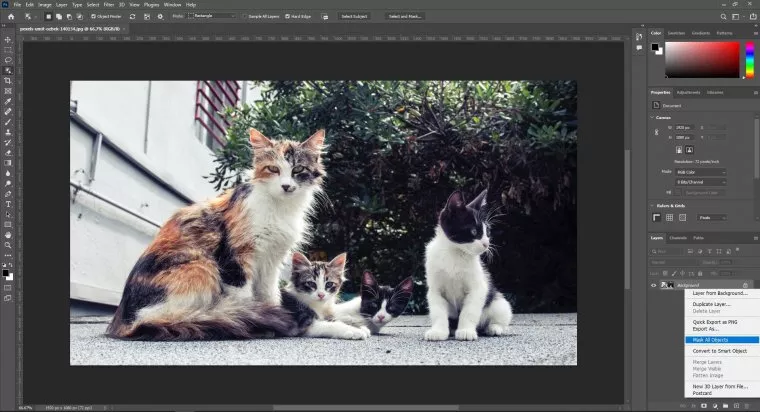
Going along the same lines of the previous tool, Adobe makes us possible to mask ALL the objects with just one click, even splitting them into individual layers. How is that possible? Well, simply open the image, go to Layer > Mask All Objects. The second method is right-clicking the layer you desire to mask, Mask All Objects (shown below).
3. Full XDR Support
If you own a new Macbook Pro 14″ or 16″, you will get the benefits of their newest XDR technology for displays, which enhance colours in a way that sets you from fake-HDR tints to a real-world appearance.
Photoshop CC 2022 now fully supports these displays, giving an extra kick on tones that are highly appreciated, especially if you work on printed format. Keep in mind if you work for digital format output, check your editing outcome on a different display as XDR is currently exclusive for the latest Apple devices. This can end up in blacks being a bit washed out in other displays as XDR enhance them from their usual performance.
4. Photoshop & Illustrator enhanced compatibility
One HUGE headache when working with graphics was trying to import vectors made in Illustrator into Photoshop. I’m not going to explain this in detail as many of you should know the experience first-hand, but Adobe has finally heard our prayers. You can now copy vectors from Illustrator directly into Photoshop, and keep its attributes such as stroke, fill, opacity, and blend mode.
Photoshop cannot handle the editing capabilities of Illustrator for these vector files (as Photoshop is a pixel-based software, not vector-based), but the pasting process also knits together the visual aspect. Adobe took this measure in case the tool used in Illustrator to create the shape is not available in Photoshop. Groups and Layers created in Illustrator to make up the vector element will also be pasted into Photoshop.
Please beware that pasting Illustrator shapes into Photoshop under this method will considerably increase the file size for your PS projects, and can also require extra RAM to process the task.
5. Landscape Mixer, Color Transfer & Harmonization
These three new neural filters are what every Photoshop user has been waiting for years! Now we can simply create realistic photo merge effects in just minutes.
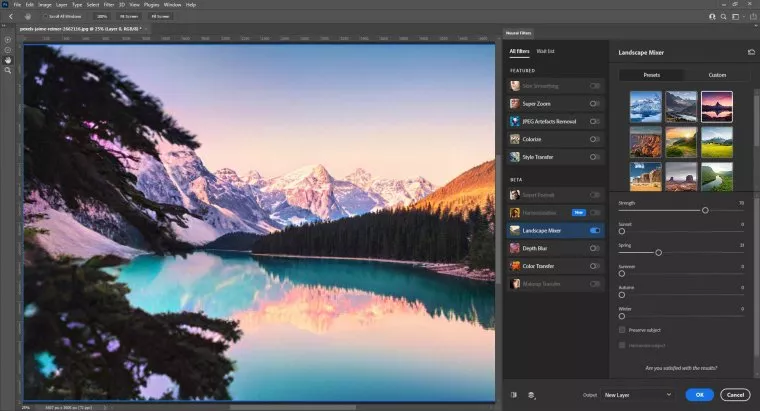
The Landscape Mixer neural filter takes your image and with a second selected photo it will merge the lighting and soil texture into your composition, say for example you want to transition a badly paved grass image with greener pastures, but with a golden hour setting. Landscape Mixer offers a set of presets with sliders to tune them, but you can also use your own images as presets by simply clicking “Custom”. It takes a while to process the effect.
 ù
ù
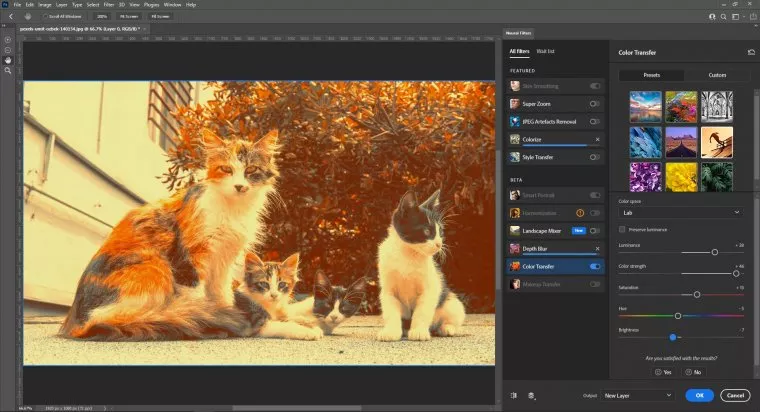
Color Transfer works as a tool for applying a simpler version of colour grading inside Photoshop. It takes the tonal values and lighting conditions of an image you select, then sync the data with the image you desire to edit.
The best of these new neural filters offered is the Harmonization one. With the Harmonization neural filter, you can perform background replacements from transparent-background layers. The lighting and tone conditions of the background will be applied to your subject. By this, you get a perfect merge of both images. A solution ideal for portrait sessions where you desire to overcome bad weather conditions.
6. Depth Blur Neural Filter
Finally, another interesting feature is the Depth Blur Neural Filter, which allows us to create natural depth to portrait photos. This is by far better managed than other editing software out there.
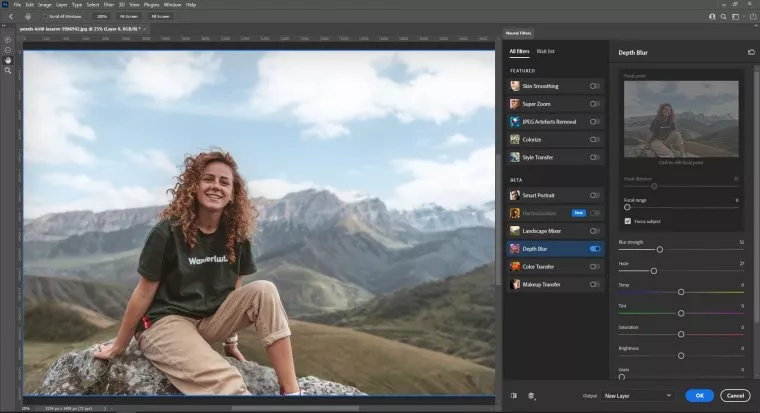
You can add film grain, haze, tweak the tonality and saturation of the background as well as the lighting.
You may be wondering: should I update my Photoshop? The answer to this question depends on:
- How old your computer is
- If you have dedicated graphics
By testing this version, and do keep in mind my laptop is from late 2016, the significance in demand shifted. This new PS 2022 is “heavier”. It shall demand more RAM, a faster processor, and dedicated graphics. The last item, because of the usage of neural filters, is to speed up the process.
If your computer is prior to 2015, don’t attempt to do it, otherwise, Photoshop may run too slow. If you lack dedicated graphics and you work via Desktop PC, aim for a cheap graphics card to help you out. Installing Photoshop in an SSD drive can also help a lot.
Even if you have years of experience with photo editing, you should learn about Photoshop 2022 new features. Adobe continually upgrades its flagship Photoshop software to incorporate new features and deliver even more value.
You may find a learning curve when trying to master a new feature. Accessing a professional Photoshop tutorial can help you get up to speed more quickly.
Well-organized sections to easily find what you need.
The FAQ section answers all your questions on digital graphics.
Testimonials from satisfied customers demonstrate GraphiMarket’s reliability.
Customization options that allow you to fully express your creativity.
Pingback: Nora Fischer
Le contenu sur les nouveautés de Photoshop CC 2022 est très informatif et bien structuré. Les explications claires des nouvelles fonctionnalités permettent de comprendre facilement comment les intégrer dans son flux de travail. C’est vraiment utile pour ceux qui souhaitent tirer le meilleur parti de ce logiciel.
Il contenuto “What’s new in Photoshop CC 2022?” offre un’ottima panoramica delle ultime funzionalità introduce nel software. Le spiegazioni sono chiare e utili per chi vuole rimanere aggiornato sulle novità. È interessante vedere come queste nuove opzioni possano facilitare il lavoro creativo.
Il contenuto su “What’s new in Photoshop CC 2022” offre una panoramica utile delle nuove funzionalità e miglioramenti. È interessante vedere come gli aggiornamenti possano semplificare il flusso di lavoro e migliorare la creatività. Sicuramente un’ottima risorsa per chi vuole rimanere aggiornato sugli strumenti di design.
L’article sur les nouveautés de Photoshop CC 2022 offre un aperçu clair des fonctionnalités mises à jour, ce qui est très utile pour ceux qui cherchent à améliorer leur flux de travail. J’ai particulièrement apprécié les explications sur les outils de retouche et les améliorations de performance. Cela donne une bonne idée de ce à quoi s’attendre et comment en tirer parti.
The updates in Photoshop CC 2022 look promising, especially the new features for enhancing productivity. I’m particularly interested in the improved selection tools and how they can streamline my workflow. It seems like a solid upgrade for both beginners and seasoned users alike.
The updates in Photoshop CC 2022 look promising, especially the new features for enhanced editing workflows. I’m particularly interested in the improved selection tools and the new neural filters. It seems like these changes could really streamline my creative process.
Ho trovato il contenuto su “What’s new in Photoshop CC 2022” davvero informativo. Le nuove funzionalità sono spiegate in modo chiaro e pratico, il che rende più facile capire come integrarle nel proprio flusso di lavoro. È un ottimo punto di partenza per chi vuole rimanere aggiornato sulle novità del software.
L’articolo “What’s new in Photoshop CC 2022?” offre una panoramica chiara delle ultime funzionalità, rendendo più semplice per gli utenti capire come sfruttare al meglio il software. Le nuove opzioni di editing e le migliorie nell’interfaccia sembrano davvero utili per chi lavora con la grafica. È un buon punto di partenza per chi vuole aggiornarsi sulle novità.
The updates in Photoshop CC 2022 look promising, especially the new features for enhancing creativity and productivity. It’s great to see continued improvements in performance and usability, which can really benefit both professionals and hobbyists. I’m looking forward to trying out the new tools and seeing how they can streamline my workflow.
The updates in Photoshop CC 2022 seem impressive, especially the new features that enhance workflow efficiency. I’m particularly interested in how the improved selection tools can save time on complex projects. It looks like a solid upgrade for both beginners and seasoned users.
I found the updates in Photoshop CC 2022 really impressive, especially the new neural filters that make editing so much easier. The enhanced collaboration features also seem like a game-changer for team projects. Overall, it looks like a great upgrade for both beginners and pros.
Il contenuto su “What’s new in Photoshop CC 2022” offre una panoramica utile delle nuove funzionalità e degli aggiornamenti. È interessante vedere come Adobe continui a migliorare l’interfaccia e ad aggiungere strumenti che semplificano il lavoro creativo. Le spiegazioni sono chiare e possono davvero aiutare sia i principianti che i professionisti a sfruttare al meglio le novità.
I found the updates in Photoshop CC 2022 really interesting, especially the new features for enhancing photo editing workflows. The improved content-aware tools seem like they could save a lot of time. Overall, it looks like a solid upgrade for both professionals and hobbyists alike.
I found the updates in Photoshop CC 2022 really impressive, especially the new neural filters that make photo editing more intuitive. The improvements in collaboration features are also a big plus for working with teams. It’s exciting to see how the software continues to evolve and support creative workflows.
Il contenuto “What’s new in Photoshop CC 2022?” offre una panoramica chiara e dettagliata delle nuove funzionalità del programma. Trovo molto utili le spiegazioni sui miglioramenti dell’interfaccia e degli strumenti, che possono davvero facilitare il lavoro di chi lavora nel design. È un’ottima risorsa per rimanere aggiornati sulle ultime novità.
Le contenu sur les nouveautés de Photoshop CC 2022 est très instructif. Il présente clairement les mises à jour et les améliorations, ce qui facilite la compréhension des nouvelles fonctionnalités. C’est un bon guide pour ceux qui cherchent à optimiser leur utilisation du logiciel.
Il contenuto su “What’s new in Photoshop CC 2022” offre una panoramica chiara delle funzionalità aggiornate. È utile sia per chi è già esperto del programma sia per i principianti che vogliono scoprire cosa c’è di nuovo. Le spiegazioni sono dettagliate e facilitate da esempi pratici, rendendo l’apprendimento più accessibile.
I found the updates in Photoshop CC 2022 really impressive, especially the new features for content-aware editing. The improved performance also makes a noticeable difference while working on larger files. It’s always great to see how Adobe is enhancing the user experience with these upgrades.
Ho trovato interessante il contenuto su “What’s new in Photoshop CC 2022”. Le nuove funzionalità sembrano davvero utili, specialmente per chi lavora nel design grafico. La spiegazione delle novità è chiara e ben strutturata, rendendo facile capire come applicarle nel proprio lavoro.
I found the new features in Photoshop CC 2022 quite impressive, especially the improved selection tools and the neural filters. They really enhance the editing workflow and make it easier to achieve professional results. Overall, it feels like a solid update for both beginners and experienced users.
Pingback: Christopher Young
L’articolo offre una panoramica chiara e dettagliata delle nuove funzionalità di Photoshop CC 2022. È utile per chi, come me, cerca di rimanere aggiornato sugli ultimi strumenti e miglioramenti. La spiegazione delle novità rende più semplice capire come integrarle nel proprio flusso di lavoro.
The updates in Photoshop CC 2022 look promising, especially the new features for enhancing workflow efficiency. I’m particularly interested in the improvements to neural filters, as they can really streamline creative processes. It’s great to see Adobe continuously evolving its tools for users.
Il contenuto su “What’s new in Photoshop CC 2022” offre una panoramica chiara e dettagliata delle nuove funzionalità. Le spiegazioni sono utili per chiunque voglia rimanere aggiornato sulle ultime novità del software. Ho trovato particolarmente interessante la sezione sulle migliorie all’intelligenza artificiale, che possono davvero semplificare il lavoro creativo.
I found the updates in Photoshop CC 2022 quite impressive, especially the new neural filters and improved content-aware tools. These features really enhance creativity and streamline the editing process. It’s exciting to see how Adobe continues to innovate for both professionals and hobbyists alike.
L’article sur les nouveautés de Photoshop CC 2022 est vraiment instructif. Il met en avant des fonctionnalités intéressantes qui peuvent vraiment améliorer le flux de travail des utilisateurs. J’ai particulièrement apprécié les explications claires sur les mises à jour, ce qui facilite leur adoption.
Il contenuto su “What’s new in Photoshop CC 2022” offre una panoramica molto chiara delle nuove funzionalità. È utile per chi vuole rimanere aggiornato e sfruttare al meglio gli strumenti disponibili. Ho trovato particolarmente interessanti le novità relative all’intelligenza artificiale, che semplificano diversi processi creativi.
The updates in Photoshop CC 2022 look impressive, especially the new neural filters and improved object selection tools. It’s great to see how these features can streamline workflows and enhance creativity. I’m looking forward to trying them out in my projects.
Il contenuto su “What’s new in Photoshop CC 2022” offre una panoramica utile delle nuove funzionalità. Ho trovato interessanti gli aggiornamenti sull’intelligenza artificiale e come semplificano i flussi di lavoro. La spiegazione è chiara e rende facile capire come sfruttare al meglio le novità.
The updates in Photoshop CC 2022 look promising, especially the new neural filters that can really enhance creativity. I’m curious to see how these features will streamline workflows for both beginners and experienced users. Overall, it seems like a solid upgrade that many will appreciate.
The latest updates in Photoshop CC 2022 look promising, especially with the improved neural filters and enhanced selection tools. It’s great to see Adobe continuing to innovate and streamline the user experience. I’m looking forward to trying out these features in my next projects.
Le contenu sur les nouveautés de Photoshop CC 2022 est très informatif et bien structuré. J’ai particulièrement apprécié les explications claires sur les nouvelles fonctionnalités, ce qui rend leur utilisation plus accessible. Cela donne vraiment envie de tester ces mises à jour dans mes projets.
I found the updates in Photoshop CC 2022 really interesting, especially the new AI features that enhance productivity. The added tools for masking and blending look promising for creative projects. It’s great to see Adobe continuously improving user experience.
Il contenuto su “What’s new in Photoshop CC 2022” offre una panoramica chiara delle nuove funzionalità e miglioramenti dell’ultima versione. È utile per chi desidera aggiornarsi e sfruttare le novità per migliorare il proprio lavoro creativo. Le spiegazioni sono concise e facili da seguire, rendendo l’apprendimento accessibile anche a chi non è esperto.
Ho trovato il contenuto su “What’s new in Photoshop CC 2022” molto utile. Le nuove funzionalità sono spiegate chiaramente e i suggerimenti pratici possono davvero migliorare il flusso di lavoro. È interessante vedere come queste novità possano semplificare il processo creativo.
I found the updates in Photoshop CC 2022 quite impressive, especially the new AI features that streamline editing. The enhancements to the user interface also make it more intuitive for both beginners and experienced users. Overall, these changes seem to significantly improve the workflow.
I found the updates in Photoshop CC 2022 really intriguing, especially the new neural filters and improved collaboration features. It’s great to see how Adobe is continually enhancing user experience and functionality. I’m looking forward to trying out these new tools in my projects.
It’s interesting to see the new features in Photoshop CC 2022. The updates, especially regarding improved performance and the new neural filters, seem like they could really enhance workflow for both beginners and pros. I’m looking forward to trying them out in my next project.
I found the new features in Photoshop CC 2022 really impressive, especially the improved selection tools and neural filters. They seem to make editing more intuitive and efficient, which is a huge plus for both beginners and experienced users. Overall, it looks like a great update that enhances creative possibilities.
The updates in Photoshop CC 2022 look promising, especially the new features that enhance productivity and creativity. I’m particularly interested in how the improved neural filters can help streamline my editing process. It’s great to see continuous innovation in such a powerful tool.
Ho trovato il contenuto su “What’s new in Photoshop CC 2022” molto informativo. Le nuove funzionalità sono ben spiegate e sembrano davvero utili per migliorare il flusso di lavoro. È interessante vedere come gli aggiornamenti possano semplificare alcune operazioni di editing.
The updates in Photoshop CC 2022 seem really promising, especially the new editing tools that enhance workflow efficiency. I’m particularly interested in the improved selection features; they could save a lot of time on projects. Overall, it looks like a solid upgrade for both beginners and seasoned users.
The new features in Photoshop CC 2022 seem promising, especially the enhanced neural filters and improved object selection tools. These updates could really streamline the editing process for both professionals and hobbyists. I’m looking forward to trying them out in my projects.
Il contenuto offre una panoramica utile delle nuove funzionalità di Photoshop CC 2022. Le spiegazioni sono chiare e dettagliate, rendendo facile comprendere come sfruttare al meglio gli aggiornamenti. È un’ottima risorsa per chi desidera rimanere aggiornato sugli strumenti di lavoro.