
The Advantages of Using Photoshop Overlays:
No matter how many techniques photographers can use to edit their photos, one of the most effective to completely transform a photo is to add an overlay.
Adding an overlay can easily transform an ordinary photo into a very special one by adding a light flare, glimmer, sky replacement overlay, or other essential actions to help your workflow thrive!
The Advantages of Using Photoshop Overlays
Long gone are the days when the only ways to professionally edit a photo were to spend hours in the darkroom or to be a Photoshop master.
Beautiful Photoshop overlays can come in handy when you want to transform your images. With a few clicks, you can create a beautiful work of art and differentiate your projects from any other.
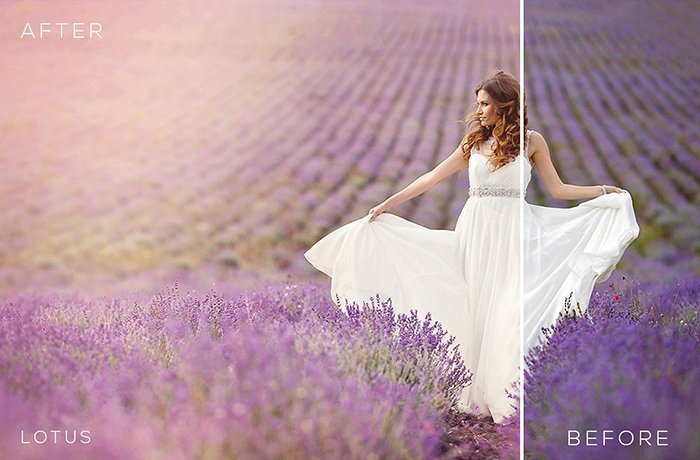
Here you have some transformation examples:
Glimmers:
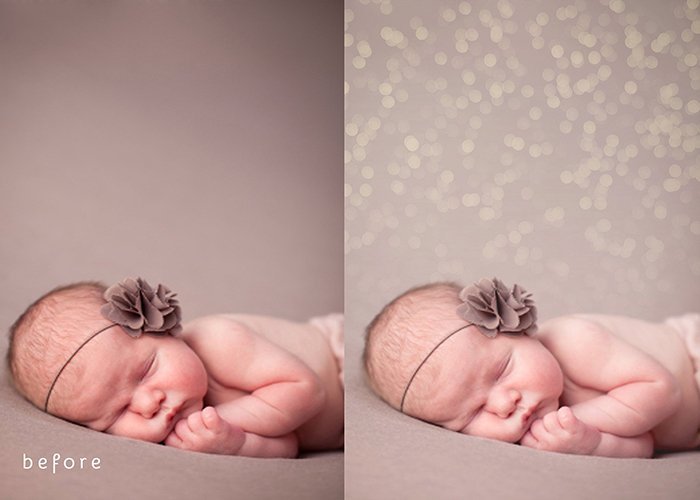
Light Flare:
Newborn Actions Collection:

Lotus:

Floridian Skies:

Photoshop overlays are very easy to use. Basically, all you have to do is drag and drop the textures in the Layers palette and then apply them to your images. Then, of course, you can continue to play with the levels of opacity, light, shadows, contrast, and make the overlays more or less obvious. The more photo tools you have to experiment with, the better.
How Beautiful Photoshop Overlays Can Help You
- Save your time
It is much faster to choose from thousands of ready-to-use textures that you can find online than to create them by yourself. There’s no need to walk around taking countless photos of sunsets, pavement and peeling paint.
- Ease your work
You will add not only value to your creative designs but also a certain something that will make your projects different from any other, easier than ever.
- Cut the limits of your imagination and creativity
They are versatile, with numerous areas of ready to use textures and designs that you can try and make everything look professional in a minute.
It can be incredibly handy to have many different photo overlays to choose from, because you may have to go through several to find the one that is the perfect fit for your photo.
- Make quick and better decisions
Beautiful Photoshop overlays can be a very helpful tool for professional photographers if they are deciding to show options to their clients. For example, professional photographers can display to their clients these different overlays so that they have a range of looks to choose from.
Try different effects on your photos, we have some great deals in our Photography category, play around with ideas and let your imagination fly.
Clean and modern design makes the user experience enjoyable on GraphiMarket.
A secure shopping experience with protected and reliable transactions.
Seasonal discounts on popular products, great for saving without sacrificing quality.
Learning opportunities with webinars and tutorials offered.
In-depth guides to choosing the best graphic tools for your needs.
Positive user feedback attests to the high quality of the site and its products.
The site is super informative, great for those looking for the latest in graphics.
Great advice and resources for enhancing your photo and video graphic skills.
GraphiMarket makes graphic design accessible to everyone, from beginners to experts.
Wide selection of graphic products, a must-visit for enthusiasts and professionals.
Intuitive navigation makes finding what you need on GraphiMarket a breeze!
This post highlights some great points about using Photoshop overlays. They can really enhance images and save time in the editing process. I appreciate the practical examples provided; they make it easier to see how overlays can improve creative work.
L’articolo offre un’ottima panoramica sui vantaggi degli overlay in Photoshop. Le spiegazioni sono chiare e pratiche, rendendo facile capire come possono migliorare il flusso di lavoro. È un’ottima risorsa per chi cerca di ottimizzare le proprie immagini in modo creativo.
This post highlights some valuable points about using Photoshop overlays. I’ve found that they really can enhance the creative process and save a lot of time on edits. It’s great to see how overlays can add depth and interest to images.
Ho trovato interessante l’articolo sui vantaggi degli overlay in Photoshop. Spiega chiaramente come questi strumenti possano semplificare il processo di editing e migliorare la qualità finale delle immagini. È un’ottima risorsa per chi cerca di ottimizzare il proprio flusso di lavoro creativo.
I found the post on Photoshop overlays really insightful. It clearly outlined how they can enhance images and save time in editing. The examples provided made it easy to see their practical applications for both beginners and experienced users.
Ho trovato l’articolo “The Advantages of Using Photoshop Overlays” molto informativo. Spiega chiaramente come gli overlay possano semplificare il processo di editing e migliorare notevolmente le immagini. Le idee proposte sono pratiche e utili per chiunque voglia approfondire le proprie abilità fotografiche.
Photoshop overlays can really enhance creativity in photo editing. They save time by providing ready-made effects that can be easily adjusted to fit different projects. Overall, they’re a great tool for both beginners and experienced users looking to improve their work quickly.
This post highlights some really practical benefits of using Photoshop overlays. I find them especially useful for quickly enhancing photos without needing extensive editing skills. The examples shared make it clear how overlays can add depth and creativity to any project.
L’articolo offre una panoramica chiara sui vantaggi degli overlay in Photoshop, evidenziando come possano migliorare notevolmente le immagini. Le spiegazioni sono semplici e pratiche, rendendo il contenuto accessibile anche per chi è alle prime armi. È utile per chi cerca modi per arricchire i propri progetti grafici.
This post provides some great insights into the benefits of using Photoshop overlays. I appreciate how it highlights both the creative possibilities and the time-saving aspects for designers. It’s definitely a useful resource for anyone looking to enhance their projects.
Ho trovato l’articolo sui vantaggi degli overlay di Photoshop molto informativo. Le spiegazioni chiare e i suggerimenti pratici facilitano davvero l’uso di questa tecnica per migliorare le immagini. È un ottimo punto di partenza per chi vuole dare una marcia in più ai propri progetti fotografici.
Ho trovato il contenuto su “The Advantages of Using Photoshop Overlays” molto utile. Spiega chiaramente come gli overlay possano migliorare la qualità delle immagini e risparmiare tempo nel processo creativo. È un buon punto di partenza per chi vuole esplorare nuove tecniche di editing.
This post highlights some great points about using Photoshop overlays for enhancing images. I appreciate how it breaks down the benefits, especially for those looking to save time on editing. Overall, it’s a useful guide for anyone wanting to improve their workflow.
Cet article sur les avantages des overlays Photoshop est vraiment intéressant. Il explique clairement comment ces outils peuvent améliorer la créativité et gagner du temps dans le processus de conception. Les exemples donnés sont concrets et facilitent la compréhension des techniques présentées.
Ho trovato molto interessante l’articolo sui vantaggi degli overlay in Photoshop. Spiega chiaramente come questi strumenti possano semplificare il processo creativo e migliorare la qualità delle immagini. Inoltre, i suggerimenti pratici forniti sono utili per chi desidera sperimentare con le proprie foto.
This post really highlights how Photoshop overlays can enhance creativity and efficiency in editing. I appreciate the practical examples provided, which make it easier to understand their application in real projects. It’s a helpful read for anyone looking to elevate their photo editing skills.
Il contenuto offre una panoramica chiara sui vantaggi degli overlay in Photoshop, evidenziando come possano semplificare il processo creativo. Le spiegazioni sono utili per chiunque voglia migliorare le proprie abilità di editing, rendendo le tecniche più accessibili. È un buon punto di partenza per chi desidera esplorare nuove possibilità artistiche.
Il contenuto offre una panoramica interessante sui vantaggi degli overlay in Photoshop, evidenziando come possano semplificare e arricchire il processo creativo. Le spiegazioni sono chiare e pratiche, rendendo facile comprendere come utilizzare queste risorse per migliorare le proprie immagini. È un’ottima lettura per chi cerca di ottimizzare il proprio lavoro fotografico.
Ho trovato interessante il contenuto su “The Advantages of Using Photoshop Overlays”. Spiega bene come questi strumenti possano semplificare il processo di editing e migliorare la qualità delle immagini. È un ottimo punto di partenza per chi vuole approfondire le proprie capacità grafiche.
Using Photoshop overlays can really elevate your designs by adding depth and texture. I appreciate how they save time while still allowing for creative flexibility. It’s a game changer for enhancing photos without starting from scratch.
The post clearly outlines the benefits of using Photoshop overlays, making it easy to understand how they can enhance images. I appreciate the practical examples provided, which really help to visualize their application. Overall, it’s a useful read for anyone looking to improve their editing skills.
Ho trovato l’articolo sui vantaggi degli overlay in Photoshop davvero informativo. Spiega chiaramente come questi strumenti possano migliorare le immagini e rendere il flusso di lavoro più efficiente. È una lettura utile per chi vuole approfondire le tecniche di editing fotografico.
I found the post really informative and it highlighted some great points about using Photoshop overlays. It’s interesting how they can save time and enhance creativity in the editing process. I’m definitely considering incorporating overlays into my workflow after reading this.
L’articolo offre spunti interessanti sui vantaggi degli overlay in Photoshop, evidenziando come possano semplificare e arricchire il processo di editing. Le spiegazioni sono chiare e pratiche, rendendo più facile capire come integrare queste tecniche nel proprio lavoro. È utile sia per i principianti che per i professionisti che cercano di migliorare le proprie competenze.
Using Photoshop overlays can really elevate your design work by adding depth and texture that might be hard to achieve otherwise. They save time and provide a creative boost, especially for those looking to enhance their photos quickly. Overall, it’s a practical tool for both beginners and experienced users.
I found this post really informative. The points about how Photoshop overlays can enhance creativity and save time in editing are spot on. It’s a great reminder of how useful these tools can be for both beginners and experienced designers.
Cet article sur les avantages des overlays dans Photoshop est très instructif. Il met en lumière des techniques pratiques qui peuvent vraiment améliorer la qualité des visuels. J’apprécie particulièrement les exemples concrets fournis, qui rendent le tout accessible même pour les débutants.
L’articolo su “The Advantages of Using Photoshop Overlays” offre una panoramica utile per chi lavora con l’editing fotografico. Le spiegazioni sono chiare e pratiche, rendendo facile comprendere come questi overlay possano arricchire le proprie immagini. Ho trovato particolarmente interessanti i suggerimenti su come utilizzarli in vari contesti creativi.
Photoshop overlays can really enhance the creative process by adding depth and texture to images. I’ve found them particularly useful for speeding up edits without compromising on quality. The variety available means there’s something for every project, which is a big plus.
This post does a great job highlighting the benefits of using Photoshop overlays. They can really enhance images and save time in the editing process. I appreciate the practical examples provided, which make it easier to see how they can be applied in real projects.
This post does a great job highlighting how Photoshop overlays can enhance images with depth and creativity. I appreciate the practical examples provided, which really illustrate their potential. It’s a useful read for anyone looking to elevate their photo editing skills.
I found the post on Photoshop overlays really insightful. It clearly outlines how overlays can enhance images and save time in the editing process. The practical examples provided make it easier to understand their value for different projects.
Il contenuto offre una panoramica utile sui vantaggi degli overlay in Photoshop, evidenziando come possano semplificare e arricchire il processo di editing. Le spiegazioni sono chiare e pratiche, rendendo più facile per chiunque, anche per i principianti, capire come sfruttare al meglio queste risorse per migliorare le proprie immagini. È un ottimo punto di partenza per chi vuole approfondire le proprie tecniche di fotoritocco.
Ho trovato il contenuto “The Advantages of Using Photoshop Overlays” molto interessante. Spiega chiaramente come gli overlay possano semplificare il processo creativo e aggiungere profondità alle immagini. È utile per chi cerca di migliorare le proprie competenze fotografiche in modo pratico.
Cet article met bien en lumière les avantages des overlays dans Photoshop. J’ai trouvé les explications claires et les exemples pratiques vraiment utiles pour ceux qui cherchent à améliorer leurs compétences en retouche photo. Cela donne des idées concrètes pour enrichir ses créations.
This post highlights some great points about how Photoshop overlays can enhance visual projects. I especially appreciate the practical examples provided, which really illustrate the benefits of layering. It’s a useful reminder for anyone looking to elevate their design work.