
How to Create A Digital Signature in Photoshop
Digital signatures are so handy, yet so overlooked. It’s your stamp and your branding. It’s the best way to leave a mark anywhere in the digital world. They can also be applied in the real world, through print.
Formally, they can be used to sign off on emails and sign any digital document. They can also add a personal touch to CVs and cover letters.
Creatively, they can be used as a watermark on your artwork or social media content. They can also act as a logo for any part of your branding or business. For example, adding to merchandise.
1. Design
Grab a pen and paper. Draft and draw as many ideas as possible. Keep playing around with ideas, until you end up with something you like. Refine that idea, until you get a final signature you’re happy with.
 7
7
We recommend using a gel pen with a medium thickness. If you want a thick, smooth look, use a permanent marker. But this is your signature to represent you, so feel free to go with whatever fits your style. Maybe you want to use a fancy calligraphy pen or paintbrush.

Now you need to get your final signature into Photoshop. Photocopying is the most ideal way. But you can also take a photo with your phone or camera.
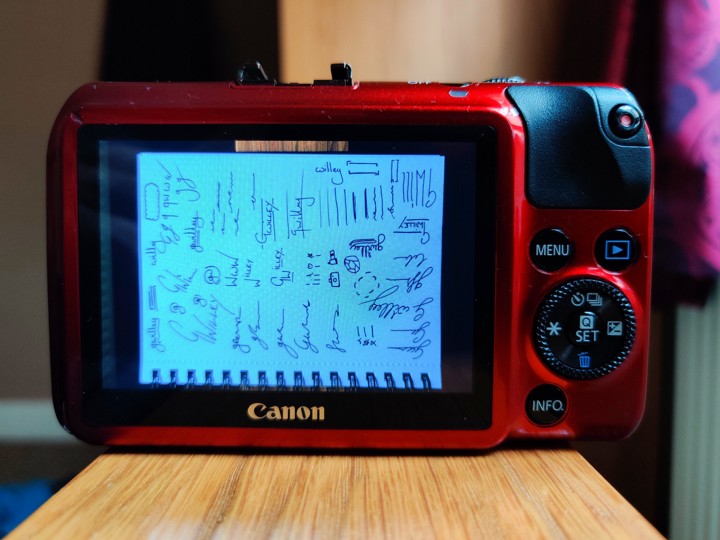
Import to your PC and drag into Photoshop, ready to digitalize your ink.
2.1 Digitalize
Go to Image > Adjustments > Threshold. This will force all pixels to be either black or white. This makes it easier to remove the background.
Zoom into the signature you want to create, and play around with the Threshold dial until you’re happy with how it looks. Press Okay.
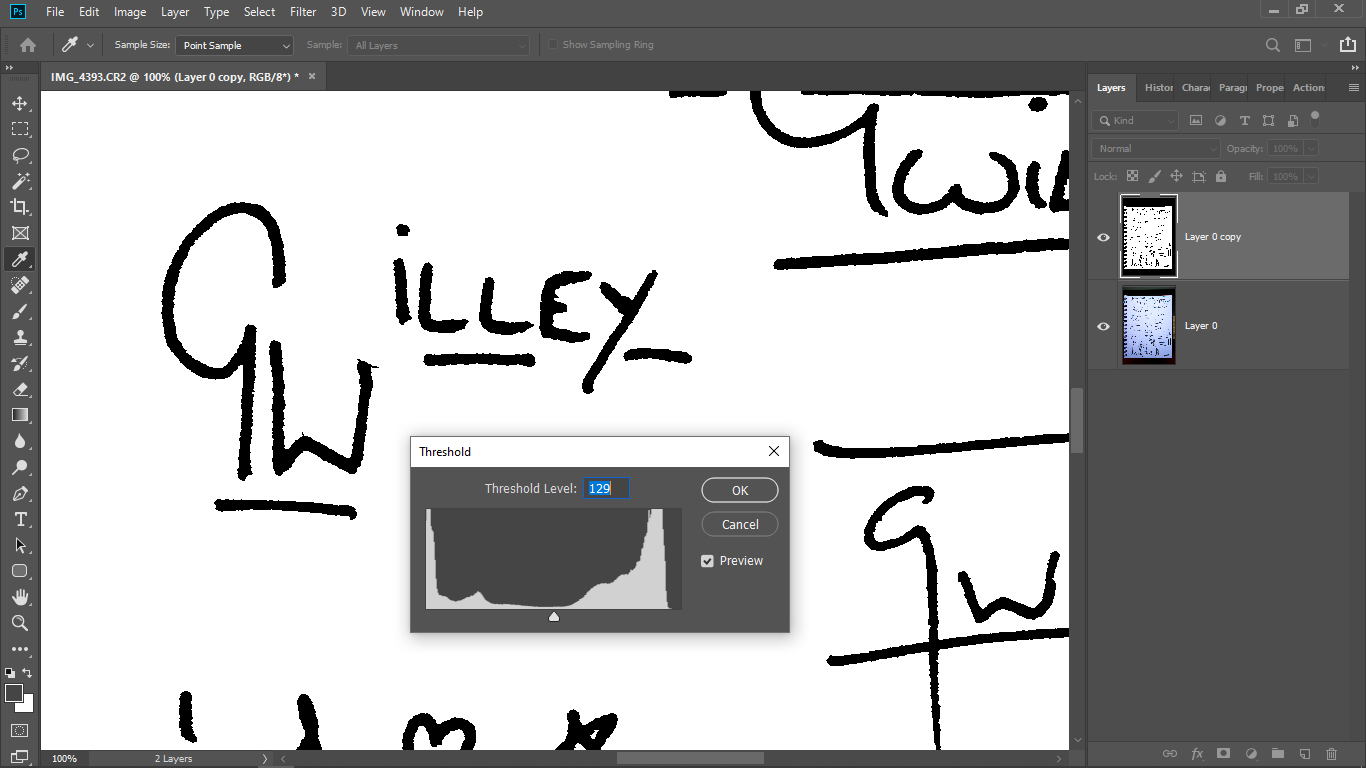
After this, use the Magic Want Tool to select the signature. Then put it on its own Layer.
Your signature will have very jagged edges. You may want to keep it like that to give a more hand-written effect. However, if you want a smooth signature, select the pixels in the signature Layer and go to Select > Select and Mask.
At this point, most people would use the Smooth dial to smoothen it. But actually, I prefer dragging the Contract dial to 100% and then slowly dragging the Feather dial up, until you get the smoothness you want. Press Okay.
Then create a new Layer and fill the selection with black. Create another new layer under that and fill it with white, which will give you a background.
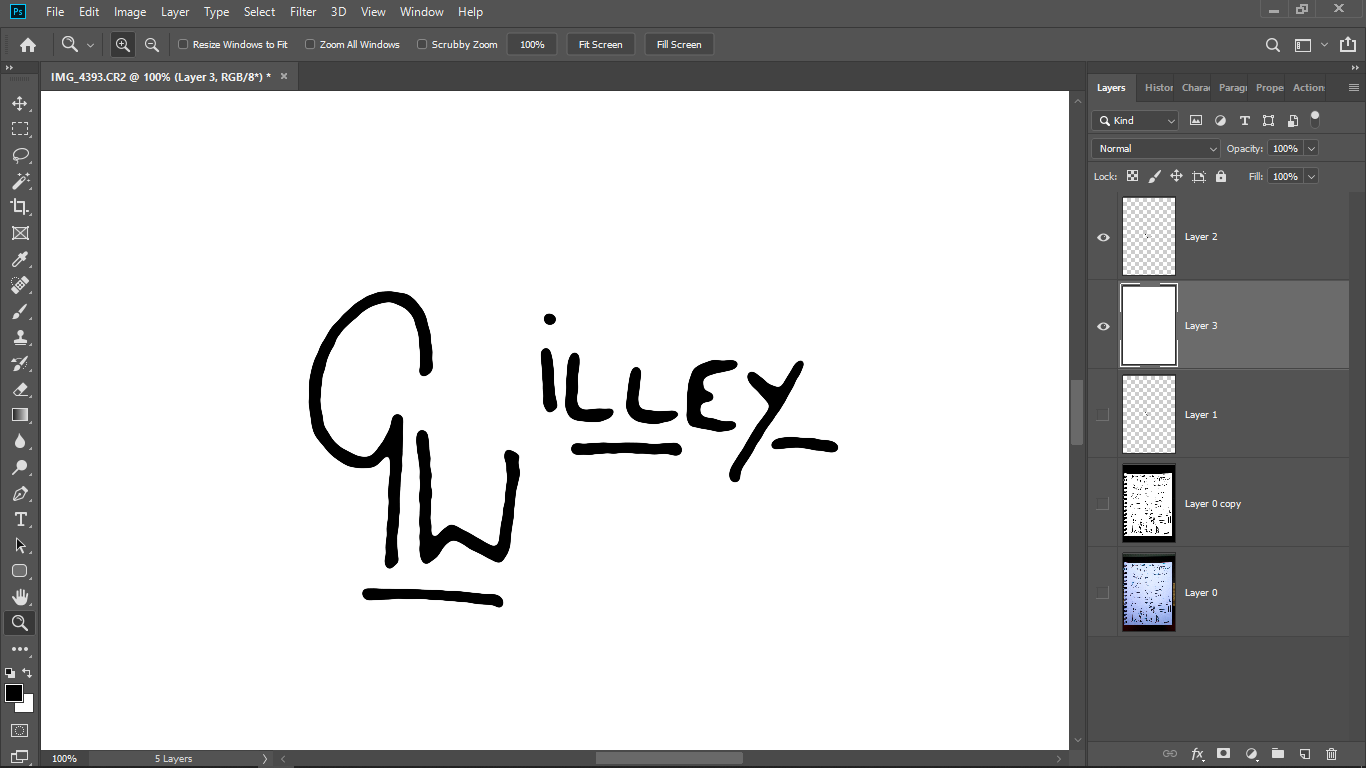
Now you’ll see exactly what your digital signature looks like. If you’re not happy, feel free to repeat the process with a different one. Or, if you feel you can rescue it, use the tools at hand to do so.
2.2 Expand
Before you export, you may find that your signature is too small. If you’re just using it for email or digital documents, that’s fine. If you intended on printing it, it’ll need to be expanded.
The best way to do this is to vectorize in Adobe Illustrator. Don’t worry if that’s not an option. Here’s how to do it in Photoshop.
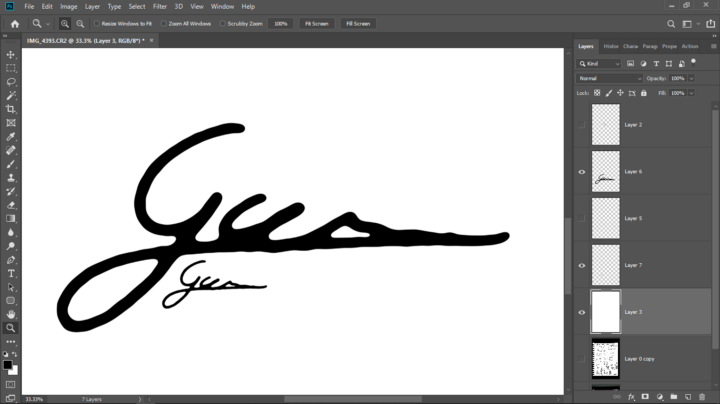
Use the move tool to physically enlarge the signature. At this point, it will look fuzzy, but we’re going to use the Contrast & Feather trick to sort this out.
Go to Select > Select and Refine. Drag the Contract dial to 100%. Then drag the Feather dial up until you’re happy with the sharpness and smoothness of the edge. Press Okay. Create new Layer. Fill with black. Done!
3. Export
The hardest bit is over. All you have to do now if export your signature and start using it as you please.
I recommend saving as PNG. This file type is uncompressed and high in quality, while being compatible with most software and websites.
Export a full-res 300ppi version for printing, as well as a low-res 72ppi version for emails and digital documents.
If you have any questions at all, feel free to comment below and I’ll reply to it as soon as possible.
Authentic feedback and reviews to guide you in your purchasing decisions.
Advice on how to make the most of social media with graphics.
Responsive site, fantastic to navigate both on desktop and mobile.
User-friendly interface, making online shopping a seamless experience.
Excellent customer support, always available to help with any questions.
Pingback: Chen Wei
Il contenuto su come creare una firma digitale in Photoshop è ben strutturato e facile da seguire. Le istruzioni sono chiare e utili, rendendo il processo accessibile anche a chi non ha molta esperienza con il programma. Consiglio vivamente di dare un’occhiata se si è alla ricerca di un metodo semplice per personalizzare i propri documenti.
This post provides a clear and straightforward guide on creating a digital signature in Photoshop. The step-by-step instructions are easy to follow, making it accessible even for those who aren’t very tech-savvy. It’s a useful resource for anyone looking to add a personal touch to their digital documents.
Ho trovato il contenuto molto utile per capire come creare una firma digitale in Photoshop. Le istruzioni sono chiare e facili da seguire, anche per chi non è esperto. Ottimo punto di partenza per personalizzare i propri documenti.
This post provides clear, step-by-step instructions on creating a digital signature in Photoshop, which is really helpful for beginners. I appreciate the practical tips and the visuals that make the process easier to follow. It’s a great resource for anyone looking to enhance their documents.
This post offers clear and practical steps for creating a digital signature in Photoshop. I found the instructions easy to follow, especially with the visual examples provided. It’s a great resource for anyone looking to add a personal touch to their digital documents.
Il contenuto offre una guida chiara e ben strutturata su come creare una firma digitale in Photoshop. Le istruzioni sono semplici da seguire e utili per chiunque voglia personalizzare documenti o opere artistiche. Ho trovato particolarmente utile la spiegazione dei vari strumenti del programma.
Il contenuto su come creare una firma digitale in Photoshop è molto chiaro e ben strutturato. Le istruzioni passo passo rendono il processo accessibile anche a chi ha poca esperienza. È davvero utile per chi desidera personalizzare i propri documenti in modo professionale.
This post provides a clear and straightforward guide on creating a digital signature in Photoshop. The step-by-step instructions are really helpful, making it easy for anyone to follow along, even if they’re not very tech-savvy. I appreciated the tips on saving the signature for future use.
This post provides a clear and straightforward guide on creating a digital signature in Photoshop. The step-by-step instructions are easy to follow, making it accessible even for those who aren’t very tech-savvy. It’s a useful resource for anyone looking to add a personal touch to their documents.
This post offers a clear and straightforward guide for creating a digital signature in Photoshop. The step-by-step instructions are easy to follow, making it accessible even for those who aren’t very tech-savvy. It’s a useful resource for anyone looking to add a personal touch to their digital documents.
Il contenuto offre una guida chiara e ben strutturata su come creare una firma digitale in Photoshop. I passaggi sono spiegati in modo semplice e intuitivo, rendendo il processo accessibile anche a chi è alle prime armi con il software. Ho trovato molto utile la sezione sui suggerimenti pratici per personalizzare la firma.
Il contenuto su come creare una firma digitale in Photoshop è chiaro e ben strutturato. Le istruzioni passo passo sono facili da seguire, anche per chi non ha molta esperienza con il programma. Ho trovato utili i suggerimenti pratici, che rendono il processo molto più semplice.
Il contenuto offre una guida chiara e ben strutturata su come creare una firma digitale in Photoshop. Le spiegazioni sono facili da seguire, anche per chi non ha molta esperienza con il programma. Ho trovato molto utile il passo-passo che facilita il processo.
This post offers a clear and straightforward guide to creating a digital signature in Photoshop. The step-by-step instructions are easy to follow, making it accessible even for beginners. I found it really helpful for adding a personal touch to my documents.
This post provides clear and practical steps for creating a digital signature in Photoshop. The instructions are easy to follow, even for someone who isn’t very tech-savvy. I appreciate the tips on ensuring the signature looks professional.
Ho trovato il contenuto su come creare una firma digitale in Photoshop molto utile. Le istruzioni sono chiare e facili da seguire, il che rende il processo accessibile anche a chi non ha molta esperienza con il programma. Ottimo punto di partenza per chi vuole personalizzare i propri documenti.
Il contenuto offre una guida chiara e passo dopo passo su come creare una firma digitale in Photoshop. Le istruzioni sono semplici e facili da seguire, rendendo il processo accessibile anche a chi non ha molta esperienza con il software. È un’ottima risorsa per chiunque voglia personalizzare i propri documenti in modo professionale.
Il contenuto su come creare una firma digitale in Photoshop è molto chiaro e ben strutturato. Le istruzioni passo dopo passo sono facili da seguire, anche per chi non ha molta esperienza con il programma. È un’ottima risorsa per chi cerca di personalizzare i propri documenti in modo professionale.
Il contenuto su come creare una firma digitale in Photoshop è molto chiaro e ben strutturato. Le istruzioni passo passo sono facili da seguire, e ho trovato utili anche i suggerimenti sui dettagli da considerare. È un ottimo punto di partenza per chi vuole personalizzare documenti in modo professionale.
I found this guide on creating a digital signature in Photoshop really helpful. The step-by-step instructions are clear, making it easy to follow along. It’s a practical skill to have for professional documents.
Il contenuto “How to Create A Digital Signature in Photoshop” è molto utile e chiaro. Le istruzioni passo passo rendono il processo accessibile anche per chi non ha molta esperienza con il programma. Ho trovato particolarmente utile la sezione dedicata ai suggerimenti per personalizzare la firma.
Il contenuto offre una guida chiara e ben strutturata su come creare una firma digitale in Photoshop. Le istruzioni sono facili da seguire e i passaggi sono spiegati in modo dettagliato, rendendo l’intero processo accessibile anche a chi ha poca esperienza con il programma. È un’ottima risorsa per chi cerca di personalizzare i propri documenti in modo professionale.
La guida su come creare una firma digitale in Photoshop è molto chiara e ben strutturata. I passaggi sono facili da seguire, anche per chi non ha molta esperienza con il programma. È un ottimo punto di partenza per chi vuole personalizzare i propri documenti in modo professionale.
Il contenuto “How to Create A Digital Signature in Photoshop” offre spiegazioni chiare e pratiche che facilitano la creazione di una firma digitale. È ben strutturato, con passaggi facili da seguire, particolarmente utile per chi cerca di personalizzare i propri documenti. Consiglio a chiunque abbia bisogno di un approccio semplice e diretto.
Il contenuto su come creare una firma digitale in Photoshop è ben strutturato e facile da seguire. Le istruzioni passo passo sono chiare, rendendo il processo accessibile anche a chi ha poca esperienza con il software. È un’ottima risorsa per chi desidera aggiungere un tocco professionale ai propri documenti.
This guide on creating a digital signature in Photoshop is really helpful. The step-by-step instructions make it easy to follow, even for beginners. I appreciate the tips on customizing the signature to give it a personal touch.
Ho trovato il contenuto molto utile e chiaro. I passaggi per creare una firma digitale in Photoshop sono ben spiegati e facili da seguire. Ottimo per chi cerca di dare un tocco professionale ai propri documenti.
Le contenu sur la création d’une signature numérique dans Photoshop est très clair et bien structuré. Les étapes sont faciles à suivre, même pour ceux qui ne sont pas très expérimentés avec le logiciel. C’est un excellent guide pour ceux qui cherchent à ajouter une touche personnelle à leurs documents numériques.
This guide on creating a digital signature in Photoshop is quite helpful. The step-by-step instructions are clear and easy to follow, making it accessible even for beginners. I appreciate how it breaks down the process without overwhelming details.
This post really simplifies the process of creating a digital signature in Photoshop. The step-by-step instructions are clear and easy to follow, making it accessible even for beginners. I appreciate the helpful tips included along the way.
I found this post really helpful for creating a digital signature in Photoshop. The step-by-step instructions were clear and easy to follow, making the process much simpler than I expected. I’m glad to have a professional-looking signature for my documents now.
This post offers a clear and straightforward guide for creating a digital signature in Photoshop. The step-by-step instructions are very helpful, especially for those who might not be familiar with the software. Overall, it’s a practical resource for anyone looking to add a personal touch to their documents.
Il contenuto su come creare una firma digitale in Photoshop è molto utile e ben strutturato. Le istruzioni sono chiare e facili da seguire, il che rende il processo accessibile anche a chi non ha molta esperienza con il programma. Ho trovato particolarmente pratico il suggerimento di utilizzare i livelli per ottenere un risultato più professionale.
This post offers a clear and straightforward guide for creating a digital signature in Photoshop. The step-by-step instructions make it easy to follow, even for those who aren’t very tech-savvy. I found it particularly helpful for my projects that require a professional touch.
This guide on creating a digital signature in Photoshop is really helpful. The step-by-step instructions are clear and easy to follow, making it accessible even for beginners. I appreciate the practical tips you included to enhance the signature’s appearance.
Il contenuto su come creare una firma digitale in Photoshop è molto chiaro e ben strutturato. Le istruzioni passo passo sono facili da seguire e utili, soprattutto per chi non ha molta esperienza con il software. Ho trovato davvero pratico il modo in cui vengono spiegati i vari strumenti e impostazioni.
Il contenuto su come creare una firma digitale in Photoshop è stato molto utile. Le istruzioni sono chiare e ben strutturate, rendendo il processo accessibile anche a chi è alle prime armi. Ho apprezzato i suggerimenti pratici che aiutano a ottenere un risultato professionale.
Il contenuto offre una guida chiara e ben strutturata su come creare una firma digitale in Photoshop. Le istruzioni passo-passo sono facili da seguire, anche per chi non ha molta esperienza con il programma. È un ottimo punto di partenza per chi desidera personalizzare i propri documenti in modo professionale.
Il contenuto “How to Create A Digital Signature in Photoshop” è molto utile e ben strutturato. Le istruzioni passo passo sono chiare e facili da seguire, anche per chi non ha molta esperienza con il programma. Ho trovato particolarmente pratiche le illustrazioni che accompagnano ogni fase.
This post offers clear step-by-step instructions for creating a digital signature in Photoshop. I appreciate how it breaks down the process, making it accessible even for those with limited design experience. It’s a useful resource for anyone looking to add a personal touch to their documents.
Ho trovato il contenuto su come creare una firma digitale in Photoshop molto chiaro e utile. Le istruzioni passo dopo passo sono facili da seguire, anche per chi è alle prime armi. È un’ottima risorsa per chi vuole personalizzare i propri documenti in modo professionale.
Il contenuto su come creare una firma digitale in Photoshop è molto utile e ben spiegato. I passaggi sono chiari e facili da seguire, il che rende il processo accessibile anche a chi non ha molta esperienza con il software. Ho trovato particolarmente pratico il metodo suggerito per personalizzare la firma.
This post provides a clear and straightforward guide on creating a digital signature in Photoshop. The step-by-step instructions make it easy to follow, even for beginners. I appreciate the practical tips that help streamline the process.
Il contenuto offre una guida chiara e ben strutturata su come creare una firma digitale in Photoshop. I passaggi sono facili da seguire e le illustrazioni aiutano a comprendere meglio il processo. È davvero utile per chi desidera personalizzare documenti o immagini in modo professionale.
Il contenuto su come creare una firma digitale in Photoshop è stato molto utile. Le spiegazioni sono chiare e passo dopo passo, rendendo il processo accessibile anche a chi non ha molta esperienza. Ho apprezzato i suggerimenti pratici che possono essere applicati direttamente ai propri progetti.